Small project · In progress
Tallymark
Sheets and games, scrambled fresh every week.
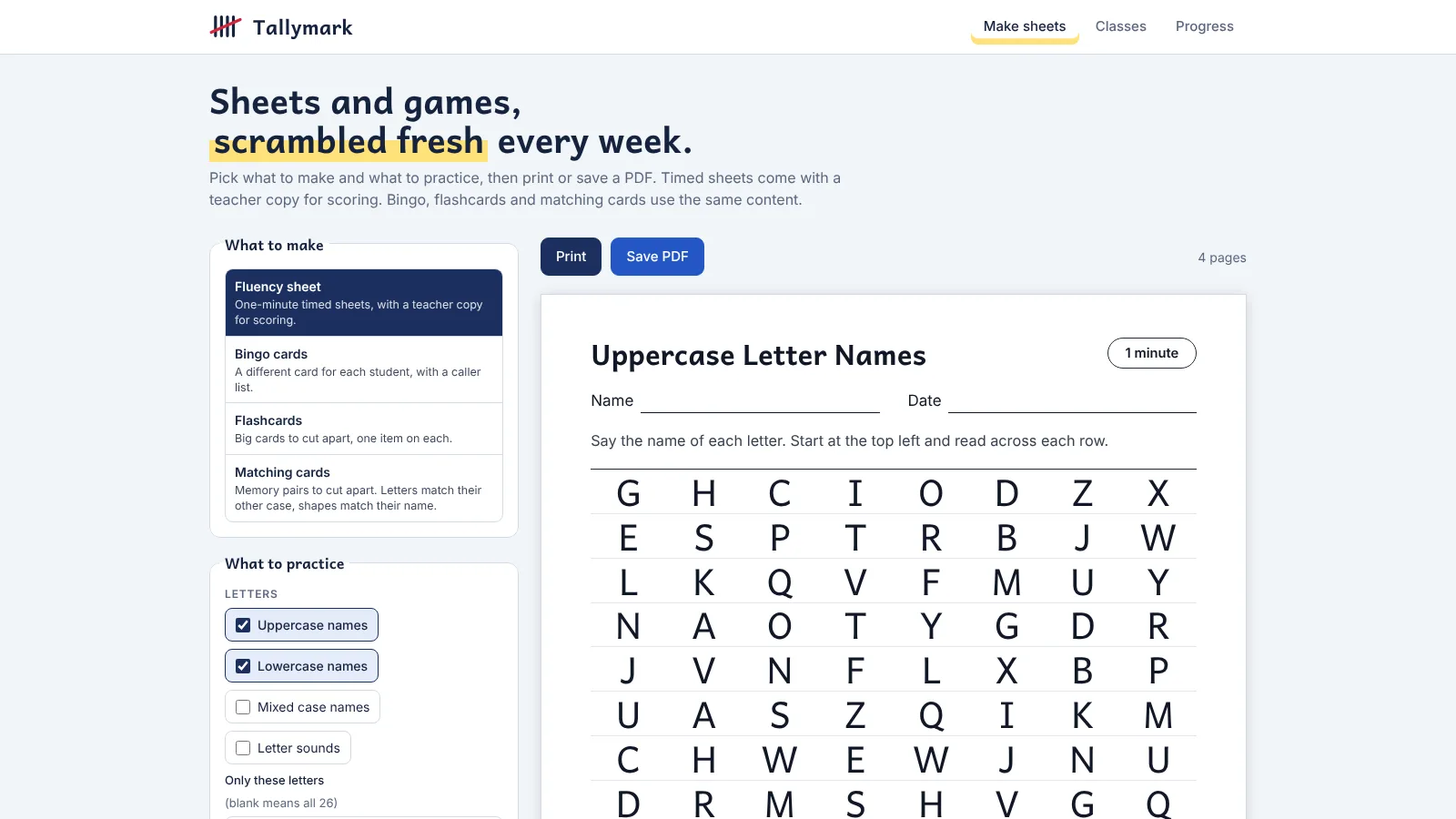
A free web app that makes scrambled one-minute fluency sheets, bingo, flashcards and matching cards for letters, numbers, shapes, colors and sight words. It began as one worksheet for my son and grew into a small teacher tool, designed and built solo with Claude Code as a coding partner. It is still in progress, and I’m adding to it as I learn what teachers need.
Free and installable. Class lists and scores stay on your device, and nothing is uploaded.
- 4
- Printable formats
- Weekly
- Fresh scramble
- Offline
- Works installed
- 0
- Servers
The 30-second version
The problem
A fixed practice sheet gets memorized within a week, and a teacher needs a different sheet for each child plus a copy for scoring.
What I did
Designed a sheet system with a seeded weekly scramble, student and teacher copies and four printable formats, then built it as an installable app with its own brand.
The result
A working app that runs offline and keeps every name and score on the device. I use it at home each week. It hasn’t been tested with teachers yet.
01 · The problem
The sheet worked until he memorized it
I time my son for one minute on letter names and sounds, and count how many he gets right. The same page every week turns into a memory test, so each week needs a new order that still covers every letter evenly.
Teachers have the same need at class size. Each student needs a different sheet, a teacher copy for scoring, and a simple way to see whether the numbers are climbing.
A few constraints shaped everything else:
- It has to print well on plain US Letter paper, in black and white.
- It has to be free to host and work with no account or server.
- Children’s names and scores must never leave the device.
02 · Design system
A small brand, written down once
The interface stays quiet so the printed sheets are the loudest thing on the screen: navy ink, one red grading-pen accent and a highlighter-yellow mark behind a key word.
Palette: navy ink, one pen red, a highlighter
Primary actions and the logo bars
The logo slash, teacher marks and errors
Behind one key word per heading
Secondary action and the focus ring
Text on printed sheets
Page ground
Type: a reader’s typeface for the paper, a plain sans for the tool
- Sheets and headings
- Andika, made for early readers, with distinct a, g, I and l
- Interface
- Inter 15 px, labels 13 px semibold
- Rule
- Never a decorative or handwriting face for a letter or number on a sheet
Voice
Write like a busy teacher’s colleague: plain, warm and brief.
- “Pick what to make and what to practice, then print or save a PDF.”
- “Class lists and scores stay on this device. Nothing is uploaded.”
Rules the screens follow
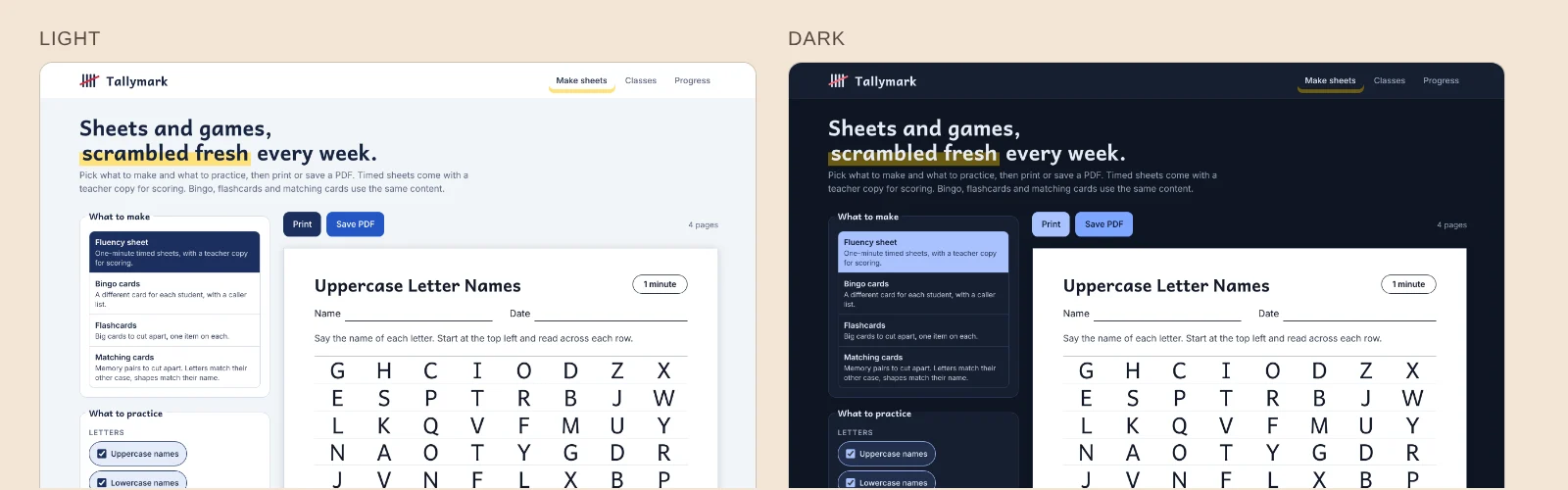
- Sheets stay white with dark ink in light and dark mode, because they model paper.
- Dark mode lightens the blues and puts dark text on them, rather than keeping white text on a saturated fill.
- Body and secondary text clear 5:1 contrast in both themes.
- Red and green are never the only cue; each comes with a word.
- Focus rings are always visible: 3 px, with a 2 px offset.
03 · Key decisions
The choices that shaped it
Not a feature tour. These are the calls that made the sheets useful to a parent or a teacher.
A scramble that is fair and repeatable
Seeded by the week
Problem
A random shuffle can repeat a letter back to back or skip one, and a different result every time you press Print makes two printouts disagree.
Approach
The week’s date seeds the shuffle, so the same week always gives the same sheet. Every letter appears equally often, and the order is repaired so the same letter never sits next to itself. Teachers can also type a code, like “Room 12 Unit 3”, for a sheet of their own.
Outcome
The student copy and the teacher copy always match, and next week brings a new order.
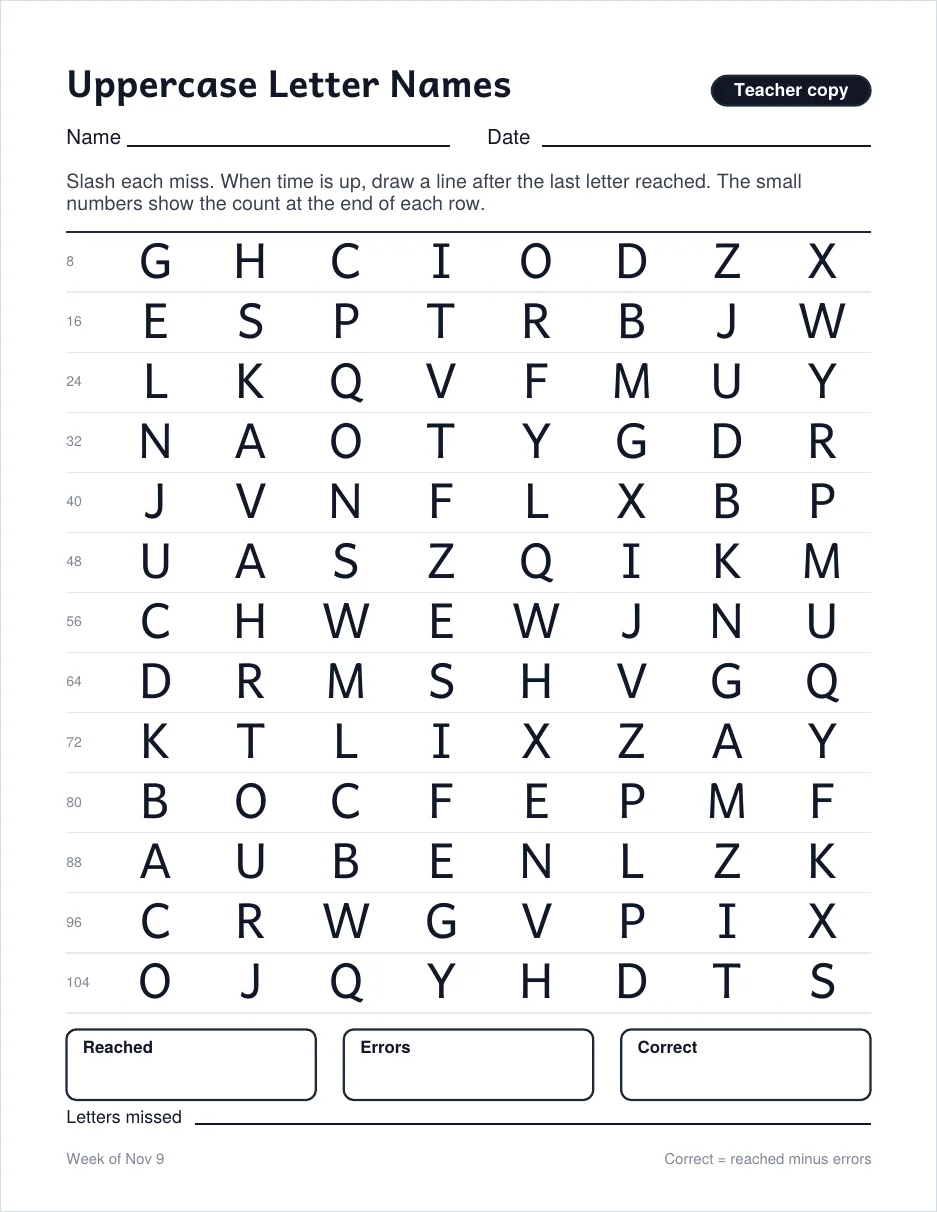
The teacher copy does the counting
Two copies, one scramble
Problem
Scoring a one-minute timing while a child reads aloud leaves no hands free to count.
Approach
The teacher copy repeats the same letters with the running count at the end of each row. Slash each miss, draw a line where time ran out, then fill in Reached, Errors and Correct. Correct is reached minus errors.
Outcome
Scoring is a glance and a subtraction, and the numbers can go straight into the progress chart.
Separate what you practice from what you print
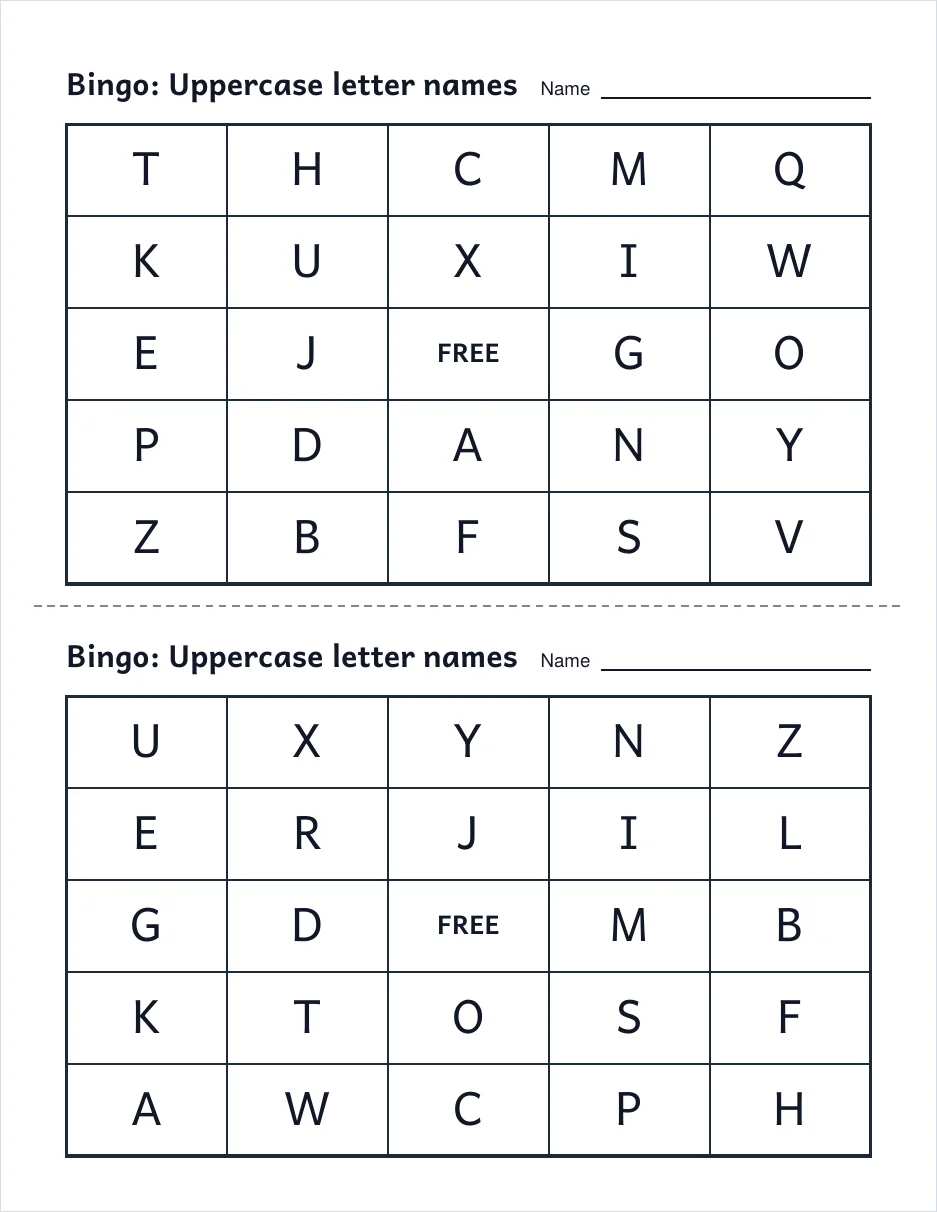
Sets and formats
Problem
Letters, numbers, shapes, colors and sight words each want sheets, bingo and flashcards. Building each pair by hand would never end.
Approach
Content is a set, and a format is a way to print it. Any set works in any format, so adding sight words or a teacher’s own list adds every game at once. Shapes and colors carry an outline and a text label so color is never the only cue.
Outcome
New ideas become one line of content, and the four formats stay consistent.
Let parents track the week
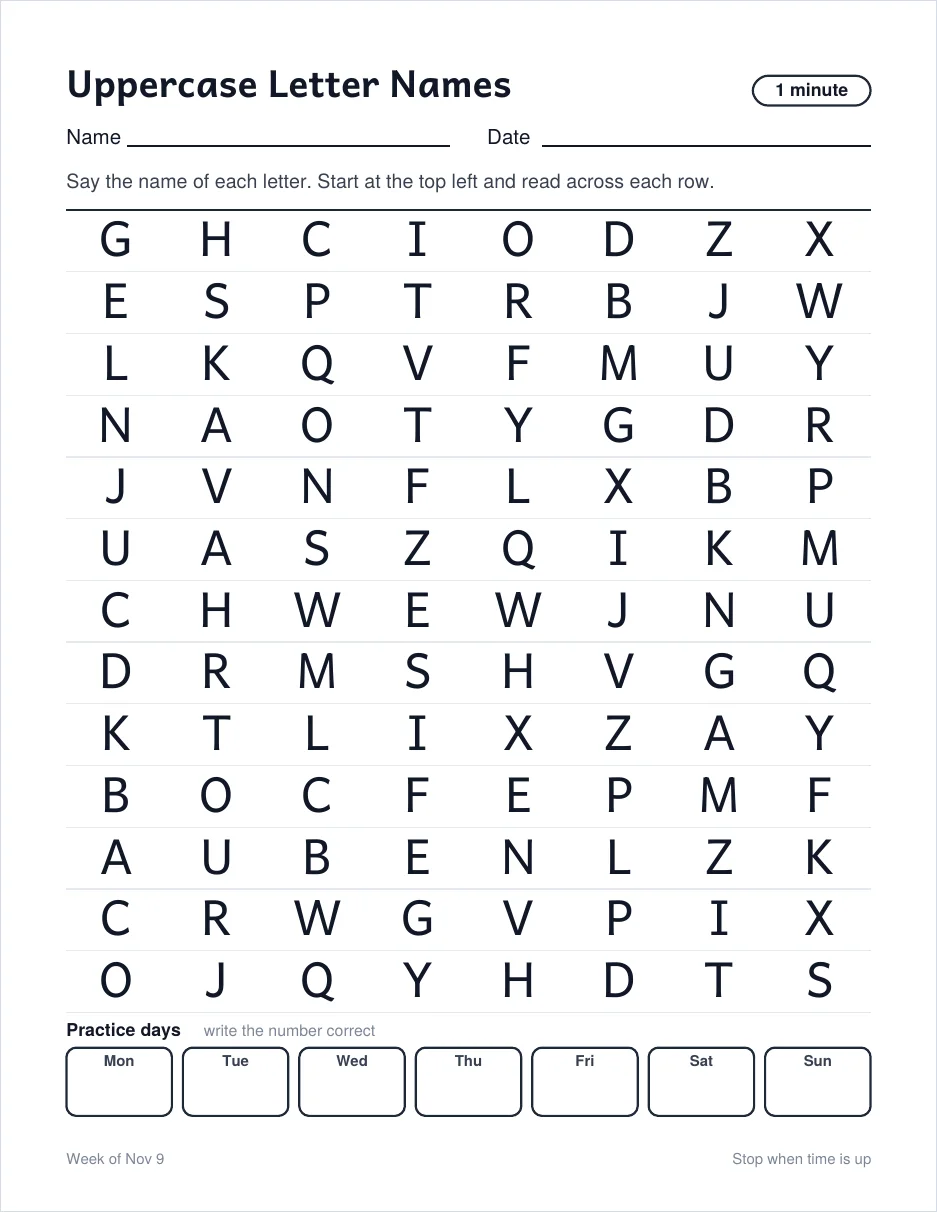
A practice-days row
Problem
A single sheet shows one attempt. A parent wants to see whether the week is going well.
Approach
The student copy ends with seven small boxes, Monday to Sunday, to write the number correct. The grid shrinks a little to make room, and it still prints cleanly on one page.
Outcome
Progress is visible on the fridge, without opening the app.
Light and dark, with paper that stays paper
Two themes, one printed page
Problem
Teachers and parents use the app at all hours, on screens set to light or dark. But a printed sheet is always black ink on white paper, so a dark preview that turned the sheet dark would lie about what comes out of the printer.
Approach
The app follows the device’s color setting. In dark mode the page and panels go navy, and the primary and secondary blues lighten with dark text on them, instead of staying saturated with white text. The highlighter dims to a muted gold behind the key word, and the pen red lightens so it still reads. The sheet itself is the exception: it stays white with dark ink in both themes, because it models paper. I checked body and secondary text against the 5:1 contrast target in both.
Outcome
The interface is comfortable in a dim room, and the preview always shows what will actually print.
Privacy by construction
No server, so nothing to leak
Problem
A class list is a list of children’s names. The safest place for it is nowhere I control.
Approach
There are no accounts, no analytics and no uploads. Class lists and scores live in the browser, with a JSON or CSV backup the teacher keeps. PDFs are drawn in the browser, so the app also works offline once installed.
Outcome
Nothing about a child leaves the device, and there is nothing for me to store or secure.
04 · Process
How I worked
I treated it as a small product: start from one real use, then grow the structure only when a second use showed up.
Start with one sheet
A single page of uppercase letters, timed for a minute, printed and tested at home. The first lesson was that print quality is the product.
Generalize the structure
Teachers’ needs (class lists, progress, custom lists) turned letters into sets and sheets into formats. I rebuilt around that split before adding more content.
Write the brand down
With the app working, I made the logo, tokens and a one-page guide with contrast checked in both themes, so new formats look like the same product.
Build with Claude Code
I designed the sheets and decisions, and used Claude Code to implement and test them. I reviewed every printed page and PDF myself.
05 · Outcomes
What it is, and what it isn’t
- Fluency sheetsStudent and teacher copies, with a practice-days row
- Bingo, flashcards, matchingPrintable games from the same sets
- Class lists and progressPer-student sheets, scores and a weekly chart, with backups
- An installable appWorks offline, with a logo and a one-page brand guide
Honestly: This project is still in progress. I use it at home every week, but it hasn’t been tested in a classroom, so I can’t claim results for teachers yet. The name is a working one, and the first thing I would do next is watch a teacher use it and see which games actually get printed.
Next project