Professional work · Previous employer
AI-first construction platform
From an empty canvas to a pilot-ready product.
A construction platform built from the ground up over about a year. I set the product direction, supported research with the pilot team, shaped the product’s features, from the documents view, CRM, tasks and activity pages to the Submittals and RFI workflows, and turned the plan into requirements and tickets the developers could build from. A designer I worked with did all of the final design work in Figma.
- ~1 yr
- Concept to pilot-ready
- 100+
- Feature tickets
The 30-second version
The problem
Construction teams lose profit to poor communication and follow-through, with paperwork scattered across too many places.
What I did
Set the product direction, shaped the product’s features around one idea (the AI does the first pass, and a person stays in control), supported research with the pilot team, and turned the plan into PRDs and more than 100 tickets.
The result
A working core platform, with document and email ingestion running in the pilot, and a pilot team warming to the AI-first direction. Submittals and RFIs were scoped, wireframed and ready for the next phase.
01 · The problem
Profit lost between the steps
A large share of a construction team’s time goes to tasks that end up off schedule or add little value. Communication breaks down between the different parts of the process, and paperwork is scattered across too many places.
The goal was a single platform that keeps project information connected and uses AI to take the repetitive work off people’s plates. The platform was built from an empty canvas, with the next phase focused on the two workflows that matter most to construction teams: submittals and RFIs.
The conditions:
- A small team, so each person covered more than one role.
- A pilot team that started out unsure how yet another application would help them.
- A product with no starting point, and two complex workflows still to be designed.
02 · Key decisions
The choices that shaped the product
One idea ran through all of it: the AI does the first pass, and a person stays in control. Around it, the thinking went into making project information easy to find and keeping follow-through visible. These are the calls that mattered most.
Let the AI do the filing, and let people correct it
Document and email ingestion
Problem
Project information lived in too many places, mainly SharePoint and email, and a lot of a team’s time went to finding things and organizing them by hand.
Approach
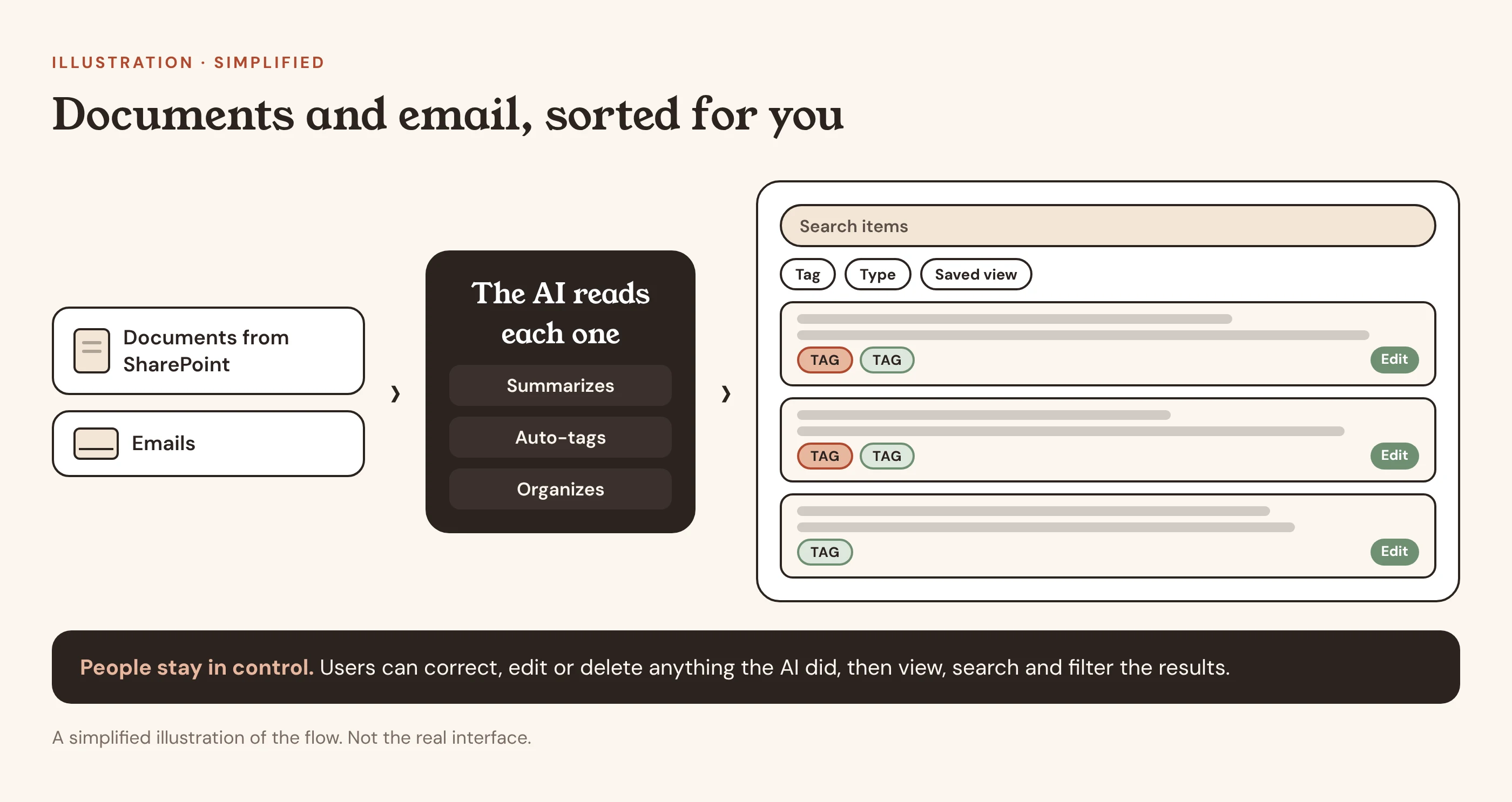
The platform ingests documents from SharePoint and emails. The AI reads them, writes a summary, auto-tags the items and organizes them, so the information arrives already sorted. My design partner and I worked out what the user sees: how the documents appear in the app and how the AI’s information is displayed, which he then designed in Figma. People can correct, edit or delete anything the AI did, and then view, search and filter the results, with saved views for the ones they return to.
Outcome
It worked in the pilot, and it was the part the pilot team seemed most interested in: having items sorted and tagged for them automatically, and then easy to find.
Keep a person in the loop
An AI-first workflow people can trust
Problem
In construction, mistakes are costly. A tool that acted on its own, without a way to check it, would not earn the pilot team’s trust.
Approach
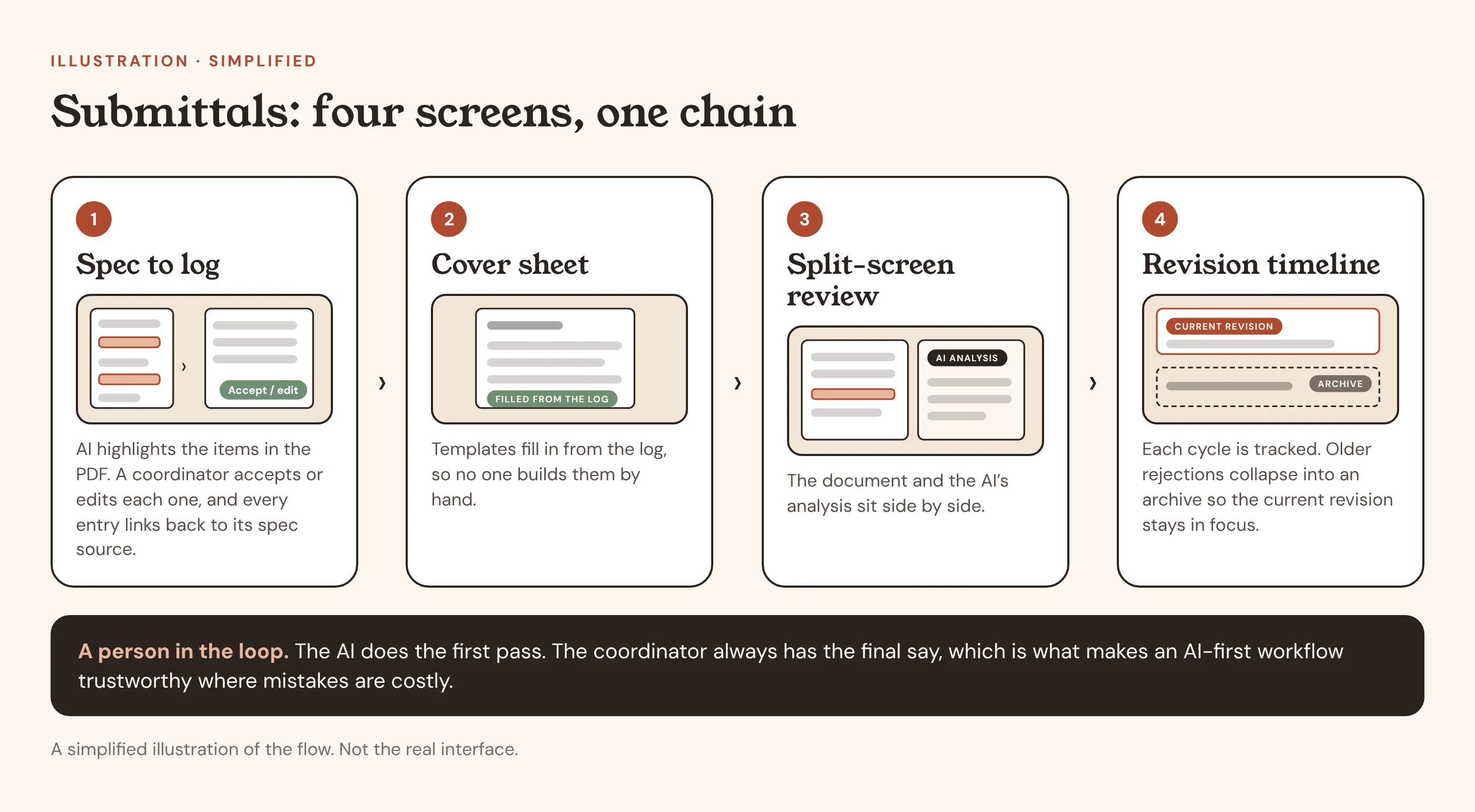
The AI does the first pass. When a PDF loads, it highlights the submittal items it extracts, using a combination of AI and rules. The project coordinator reviews the highlights and accepts or edits them before the log is finalized. Each entry keeps a link back to its spec source, and a coordinator can attach an alternative document when no spec sheet exists.
Outcome
The AI removes the repetitive work, and the coordinator always has the final say.
Three jobs in one place
Less copying, more reviewing
Problem
Reviewing submittals, adding log entries and creating cover sheets meant a lot of copying and pasting between documents.
Approach
Submittals became a four-screen chain: spec-to-log automation; cover sheets that fill in from the log; a split screen with the document and the AI’s analysis side by side; and a revision timeline, where older rejection cycles collapse into an archive so the current revision stays in focus.
Outcome
Designed to cut review time significantly, so people spend less time copying and more time reviewing what matters.
Make RFI follow-through visible
Questions shouldn’t fall through the cracks
Problem
RFIs sit at the heart of the communication problem: a question goes out, and the answer, or the missing answer, can be easy to lose.
Approach
A Kanban board with five statuses (Draft, Pending, Submitted, Responded, Closed) and swimlanes for cost impact, time impact and priority. A tiered approval flow, where the coordinator drafts and a manager approves before anything goes to the owner. Automated reminders for overdue responses, with custom frequency. Related submittals, tasks, change orders and emails linked inside the RFI. Admin reopen controls that require a logged justification. And AI summaries, so a 20-response thread can be understood quickly.
Outcome
Nothing requires hunting through other screens, and overdue items don’t depend on someone remembering them.
Reuse the full detail view
One version, not two
Problem
A slide-in preview for RFIs would have been a second, lighter version of the same information.
Approach
We reused the full detail view instead of building a separate preview.
Outcome
The experience stays consistent, and there is only one version to maintain.
03 · Process
How I worked
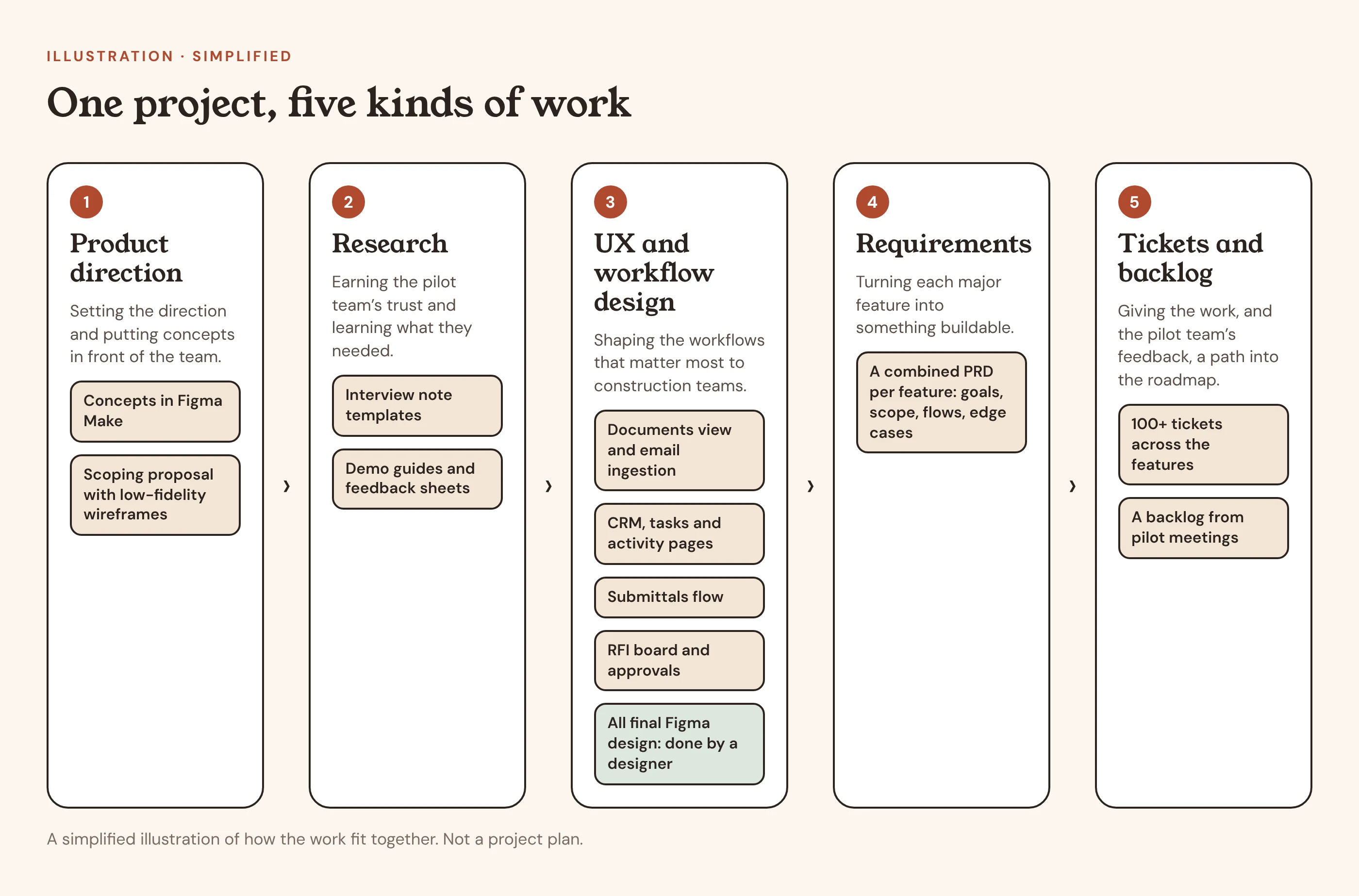
On a small team, my work spanned product direction, UX/UI design, research, requirements and tickets. Here is how those pieces fit together.
Start fast, with concepts
We began with the core CRM features every project team needs: a dashboard, projects with their own sub-navigation, contacts, companies, tasks, activities, and admin and user settings. I developed the direction in Figma Make alongside my own ideas, which let me put many concepts in front of the team quickly. I handed those to our designer, who did all of the actual design work in Figma, building out the final components and visual style on Tailwind as the base for our component designs, so we could spend our time improving the experience instead of building every small piece from scratch.
Earn the pilot team’s trust
We ran guided tours of the app with the pilot team and gathered their feedback. To prepare, I made interview note templates, demo guides and feedback sheets. We didn’t get to formal interviews, so the tours and feedback are what we learned from. Once they saw the AI-first direction the product was built on, the pilot team began to buy in, and their feedback fed a backlog that shaped what we prioritized next.
Turn big ideas into buildable work
For each major feature I wrote a combined PRD covering goals, scope, flows and edge cases. I broke the features into more than 100 tickets. Submittals and RFIs were next in line, so I wrote a scoping proposal with low-fidelity wireframes to help stakeholders decide what belonged in a first version, and organized a backlog from meetings with the pilot team.
04 · Outcomes
Where it stood, and what I learned
- Document and email ingestionWorking in the pilot: AI reads SharePoint documents and emails, summarizes, tags and organizes them, and users can correct, edit, delete, search and filter
- The core platformDashboard, projects, contacts, companies, tasks, activities, and admin and user settings
- Research materialsInterview note templates, demo guides and feedback sheets
- Submittals and RFIs, ready for the next phaseScoped, wireframed and broken into tickets
- A pilot-team backlogOrganized from meetings with the pilot team
Honestly: By the time I left, the core platform was in place and the pilot team was warming to the AI-first direction. I don’t have measured results to share. On a small team my role grew into a mix of UX and workflow designer, requirements writer and ticket writer. If I did it again, I would work out early where my role sits within a small team, so I could be deliberate about which hat I was wearing instead of picking them up as I went. Using AI tools for both research and design let a small team move quickly across the whole process.
Next project